Cloning This Repo#
Clone the repo using git#
Clone this repo with the following command (note the –recursive flag!):
git clone --recursive https://github.com/wvu-irl/reu_ros2_tutorial
#TODO: Remake video
Open the reu_ros2_tutorial folder in VSCode#
#TODO: Remake video
Now, let’s open VSCode to the directory for the reop we have just cloned. When prompted to install recommended extensions, click yes. See the following gif for details if you are confused.
Install workspace recommended extensions#
#TODO: Annotated image with recommend extensions pop up.
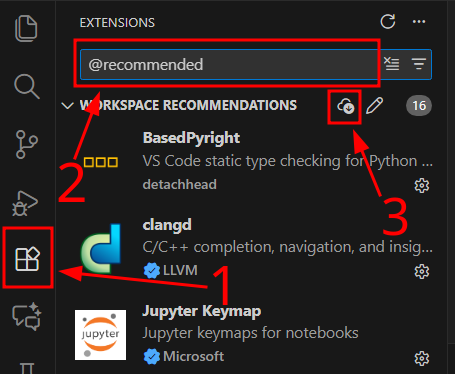
If the prompt to install recommended extensions did not appear or if you want to check for newly added recommended extensions you can search for @recommended in the “Extensions” menu. To download all recommended extensions click the small download button under the search bar.
Open a VSCode terminal (shell)#
This can be done by going to the menu View->Terminal. Alternatively the keymap Ctrl-` will toggle the terminal pane open/closed.
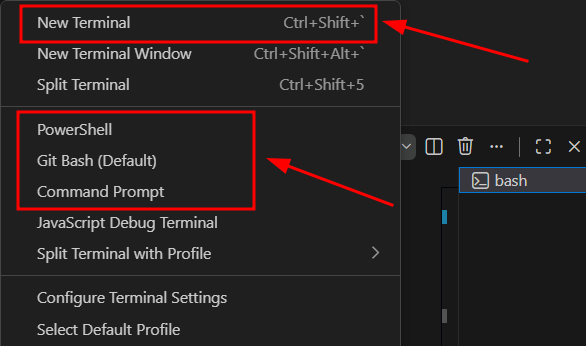
We can have VSC open a variety of shells. On windows we can select from gitbash, CMD, and powershell. You may do this by clicking on the small down arrow at the top of the terminal pane.
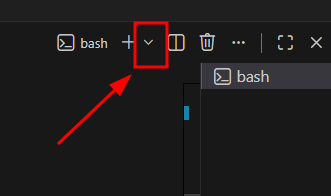
We can make additional terminal windows here if desired. Alternatively, the keymap Ctrl-Shift-` will also do this.